Skip to content
  • There are no suggestions because the search field is empty.

Introduction

Explore the 3D Visualizer components and workflow


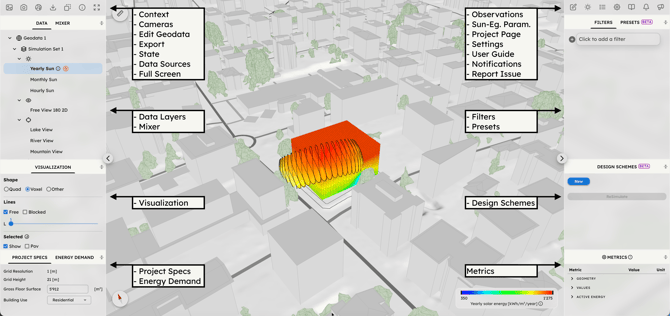
In the 3D visualizer you can filter, combine and transform data to create results. In the Visualizer GUI you find the following main group of features: 

LEFT COLUMN

RIGHT COLUMN


TOOLBAR
- Context: Hide or show scene elements
- Cameras: Save or load custom viewpoints
- Edit Geodata: Customize the 3D context
- Export: download 3Ds, images, videos
- State: Save or load 3D scene state
- Data Sources: Access dataset metadata
- Full Screen: Toggle full screen mode


TOOLBAR
- Observations: Save/load scenes
- Solar Energy Parameters: Adjust sun inputs
- Project Page: Return to web-app
- Settings: Change display settings
- User Guide: Open documentation
- Notification Center: Read notifications
- Report Issue: Request support, report bugs


- Data Layers
: Select simulation outputs
- Mixer: Combine environmental datasets


- Filters:
Extract volumetric outputs
- Presets: Apply pre-made filter sets


- Visualization:
Edit data representation


- Design Schemes:
Transform data in design


- Project Specs: View/edit project data
- Energy Demand: View/edit energy params


- Metrics:
View numerical values and KPIs

Visualizer - intro