
In the Data panel, you can switch between different Geodata and Simulations. If a layer contains multiple frames, you can select a specific one or combine them using the Aggregate feature.
-
Solar Radiation: Total incident solar time or energy, including the direction of origin. Switch between Energy and Time, or scroll through the 12 months and 24 hours datasets.
-
Free View: the free visibility from a given observation point, quantified as a fraction of a defined visible area or volume (horizontal circle, half-circle looking outwards from the site center, sphere, etc).
-
Target View: The visibility of a specific target area, quantified as the percentage that target occupies within a full spherical field-of-view. You can switch between different targets (e.g., lake, river, forest, custom polygon) defined during the Geodata setup.
-
Traffic Noise: Sound pressure levels originating from selected traffic sources.
-
Wind: Airflow velocity (speed and direction) based on the corresponding wind patterns.
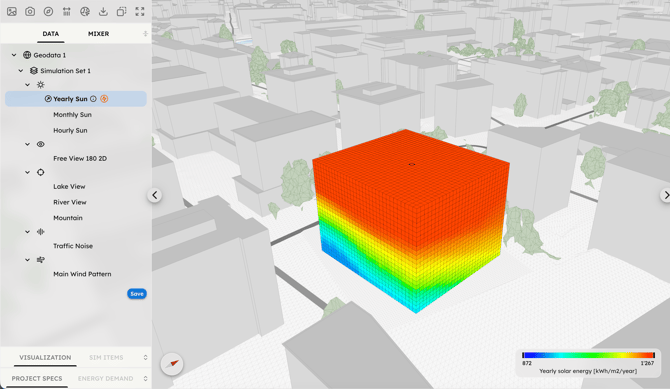
For each data layer you can set the Value Mode to select which result to represent in the 3D Scene:
-
Vectorial: displays both direction and intensity. It is ideal for identifying the optimal orientation of surfaces (e.g., windows or PV panels) to maximize a resource.
-
Scalar: displays intensity based on the sum of all lines, regardless of direction. This represents the total potential at a point in unobstructed conditions.
Wind and Noise simulations provide only Vectorial results, while Sun and View simulations offer both Vectorial and Scalar results. The Scalar value results from the scalar addition of individual rays or lines-of-sight reaching a sensor point independently of their direction (e.g., the total hours of sun hitting a point over a year). The Vectorial value results from the vectorial addition of these individual lines as vectors and is therefore subject to the subtractive effect of opposing directions.
The default Value mode for Sun, Target View, Noise, and Wind simulations is set to Vectorial (showing both direction and intensity), while the Free View simulation is set to Scalar, which is more suitable for symmetrical sets of lines. Higher Vectorial values represent a higher directional concentration of lines compared to a more dispersed distribution. These points are more suitable for distributing and orienting planar surfaces, such as windows to capture a view or PV panels to get solar energy.
The Vectorial value of solar energy also corresponds to the energy incident on a surface perpendicular to that direction, provided that all the rays generating the main direction reach its front face. In some cases, specifically those in which the resource can be freely captured from any direction, such as situations where a user is free to rotate or where no obstructions are added to the space, it could also be useful to verify the Scalar value mode.