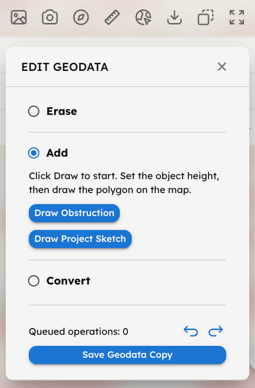
Use this section to edit the existing Geodata and customize your 3D environment:
-
Erase: Select one or more context buildings or trees to remove them from the scene.
-
Add: Draw a new volume.
-
Draw Obstruction: Manually draw a new context building to act as a physical obstruction in your simulations.
- Draw Project Sketch: Draw a 3D sketch of your project. Note that the sketch must be entirely within the Analysis Area. This volume can be used with the Close to Project filter to analyze specific surfaces.
-
-
Convert: Select one or more existing context buildings, within the Analysis Area, to convert them into Project Sketch.
Note: When you erase, add or convert context objects in the existing Geodata, a new Geodata Copy will be saved. You can then run new simulations on this updated version from your Project Page. Please note that changes to the context will not affect simulations already completed for the current Geodata.