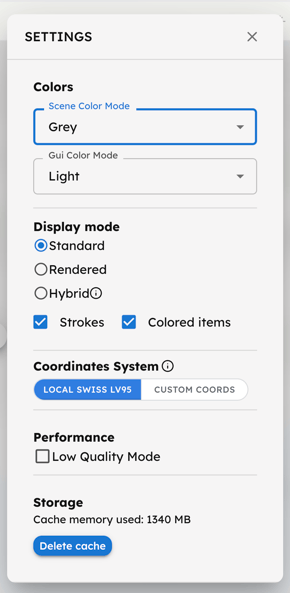
Use the Settings button to:
- Chance colors: Select the 3D Scene Color Mode (Grey, White, Colored, or Dark) and the GUI Color Mode (Light or Dark).
- Set Display Mode: Choose how the 3D scene is rendered. Options include Standard, Rendered, and Hybrid (standard buildings + rendered terrain). You can also show or hide stroke lines, as well as the colors of environmental items like water and vegetation.
- Change Coordinate System: Local Swiss LV95 uses the default Swiss reference system. Custom Coords lets you define your custom anchor point (always in LV95 Swiss reference system). This setting is applied at grid level.
- Monitor the Storage cache memory used and and enable Low Quality Mode to optimize Performance.