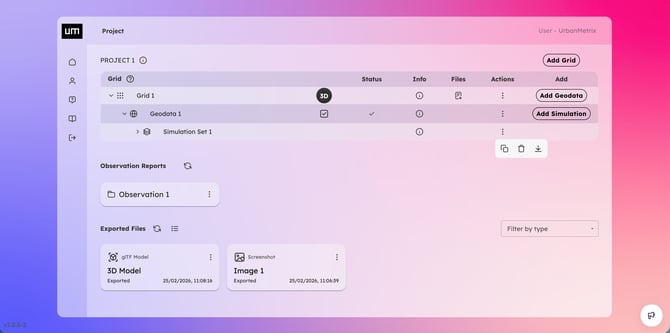
The Project Page provides a comprehensive overview of your project. From here, you can explore and manage all generated Grids, their associated Geodata, and related Simulations.
Data Management
For each item (Grid, Geodata, or Simulation), you can perform the following actions:
-
Create new: Start a new process directly from the project dashboard by pressing Add.
-
Manage assets: Rename, Delete, or Clone existing data to streamline your workflow.
-
View details: Click the Info (i) icon to access in-depth information and technical data for any specific asset.
Visualization and Analysis
-
3D Visualizer: Click the 3D icon to launch the interactive scene and start the visual analysis.
-
Files: Access and download all files previously exported and saved on Cloud for each specific Grid.
-
Observation Reports: Access your saved scenes. An Observation Report captures a specific state of the visualizer, allowing you to return to the exact settings, camera angle, and data layers you previously configured.