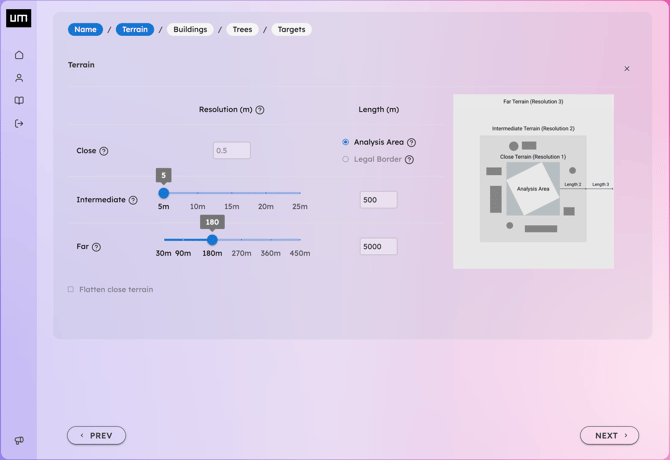
To properly define your Geodata and Simulation parameters, we recommend first inspecting your site using Google Maps or Google Earth. This helps identify key visual targets (e.g., lakes, rivers, mountains, green areas) and define the extent of terrain, buildings, and trees. We suggest limiting these areas to what is strictly necessary to avoid excessively long simulation times and large file sizes.
Here are some tips to refine the default parameters for better results:
- Increase the Intermediate Terrain length to include more surrounding buildings for obstruction or visual reference. Define the Far Terrain length to include the relevant horizon line, which is essential for accurate sunrise and sunset calculations.
- Set the distance and resolution of visible Trees within the analysis area.
- Include geographical elements of interest for Target-View simulations, such as lakes, rivers, or forests. You can define Custom Polygons (e.g., mountain peaks, hills, parks) by manually drawing only the specific target area relevant to your analysis, nothing more, nothing less.
-
Review your settings and click Finish to finalize the Geodata addition.
-
Depending on the complexity of the datasets, your Geodata may require a few minutes to process. You can open the 3D Visualizer as soon as the Geodata status is marked as complete, you don't need to wait for Simulations to be launched.