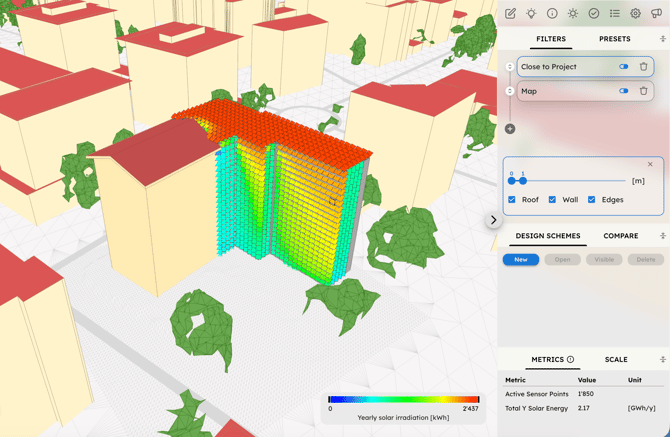
In many scenarios, the shape of one or more buildings is already defined, such as when:
-
The building already exists.
-
The future building massing is highly constrained by site boundaries and zoning regulations.
-
A preliminary building massing idea has emerged from an empty-site analysis.
In all of these cases, you can enter Geodata Edit mode to draw a project sketch, or create/clone a grid and import a simplified shape of your project as an OBJ file.
Running simulations with the Project Sketch inside the site automatically accounts for self-obstruction. A key advantage offered by UrbanMetrix, compared to traditional tools, is that the positioning and direction of environmental resources remain independent from the specific geometry of the Project Sketch. This allows you to use the data to locate and orient architectural components such as openings, balconies, shadings, and PV panels in a highly informed manner.
To analyze building surfaces in the visualizer, you can follow a process very similar to the Empty-Site Analysis, utilizing features like Threshold filter and PoV camera. Additionally, the following filters are specifically designed for this workflow:
-
Close To Project: Analyzes the sensor points in close proximity to the building using the Walls, Roof, and Edges options.
- Map: Re-applies the color-mapping exclusively to the reduced subset of previously filtered Sensor Points.